How to become a Vendor
Ready to reach thousands of industrial buyers across Nigeria? Here's what you need to get started.
Steps to Apply
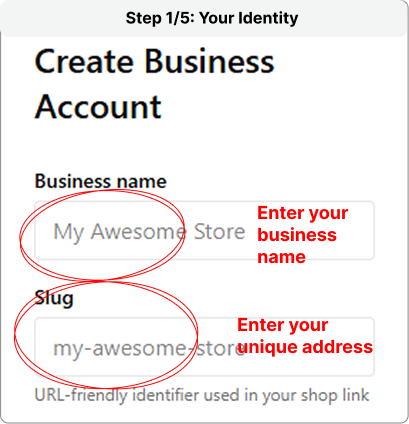
Step 1: Vendor Identity
Enter your Business Name (e.g., John Ventures) Next, choose a Business Slug, which serves as your unique web address on IndustrialMart. It appears as “industrialmart.ng/shop/your-slug”.
Step 2: Business Description
Briefly describe what your business offers. Highlight your key products, services, or specialties to attract the right customers. Clear descriptions help customers understand your brand and attract the right buyers.
.png)
Step 3: Upload Your Business Cover Photo
Add a high-quality image that represents your business. This could be a logo, storefront, warehouse, or images of your products. This photo will appear on your vendor profile, so choose something professional that helps buyers recognize your brand.
.png)
Step 4: Stay Connected
Provide your business contact details so customers can easily reach you. Enter your email, phone number, and WhatsApp number. Note: Your email can’t be changed later, so ensure it’s correct.
.png)
Step 5: Start Selling.
Enter your business address to complete your registration. Once done, click “Create Business Account” to finish setting up your vendor profile and start selling on IndustrialMart.
.png)
What happens next
After approval, you can log in to your vendor dashboard and start adding products, setting prices, and connecting with buyers.
Questions? Contact our vendor support team at
[email protected].