How to Sell on IndustrialMart
Ready to list your products and connect with buyers? Follow these simple steps to get started.
Steps to Sell
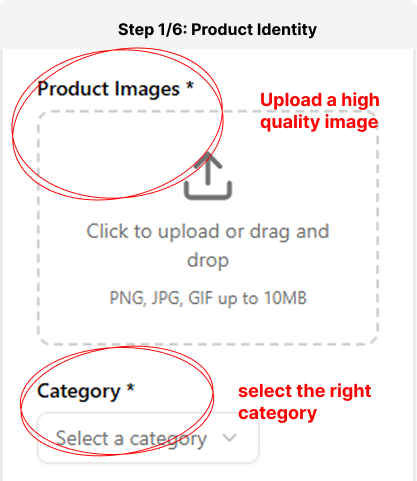
Step 1: Upload your product image
Show customers exactly what you’re selling. Upload clear, high-quality images of your product and select the right category so buyers can easily find it. Tip: Use bright, uncluttered photos that highlight your product’s best features.
Step 2: Your Business Location
Add your business location so customers know where you operate from. This helps improve trust and makes delivery or pickup easier. Once you’ve entered your location, click Next to continue.
.png)
Step 3: Set Your Product Price
Add your product’s price details to help buyers make quick decisions. Choose your price type (fixed or negotiable) and select your sales type (wholesale or retail). Be sure your pricing reflects the value and quantity you’re offering.
.png)
Step 4: Fill in Product Details
Give your product a clear name and description so buyers understand exactly what you’re offering. Be specific about key features, materials, or uses, this helps your product stand out and builds buyer confidence.
.png)
Step 5: Business Information
Enter your business name and contact number so buyers can easily identify and reach you. Once everything looks good, click Next to continue.
.png)
Step 6: Submit Your Product
Review all your product details to make sure everything is accurate. Once you’re satisfied, click Submit Product to send it for review and get one step closer to selling on IndustrialMart.
.png)
What happens next
After approval, your product will be visible to thousands of buyers across Nigeria. You'll start receiving inquiries and can manage your listings from your vendor dashboard.
Questions? Contact our vendor support team at
[email protected].